

Starting your first game project is exciting—until choosing the right development tool becomes more complicated than the original idea. New creators quickly discover visual platforms, professional engines, coding frameworks, templates, asset libraries, and AI-assisted tools, all promising a faster route from concept to playable experience.
The real question is not which option is universally better. It is which option matches your current skills, project size, available time, and long-term goals.
A beginner testing one simple mechanic does not need the same development environment as a studio planning a large multiplayer title. Choosing technology that is too advanced can slow your progress. At the same time, choosing a limited tool may create problems if your project later requires features the platform cannot support.
Understanding the differences before starting can save you months of frustration and help you choose a realistic path toward completing your first playable project.
What These Two Types of Development Tools Actually Do
A visual creation platform is designed to reduce the technical barriers involved in development. It may include drag-and-drop controls, ready-made behaviors, templates, visual scripting, built-in publishing options, and reusable assets.
Instead of developing every underlying system manually, creators can focus more heavily on mechanics, goals, levels, rewards, and player experience.
A game engine is a broader professional development environment. It usually handles important systems such as:
- Graphics rendering
- Physics calculations
- Animation
- Audio
- Player input
- Scene management
- Scripting
- Artificial intelligence
- Platform deployment
Engines provide greater freedom, but that freedom introduces more decisions. Developers may need to select a programming language, organize files, configure physics, manage assets, optimize performance, and solve platform-specific technical issues.
The main difference is not simply easy versus difficult. It is abstraction versus control.
Visual tools hide much of the technical complexity so creators can work faster. Engines expose more of that complexity so developers can control the project in greater detail.
Learning Curve: How Quickly Can You Become Productive?
For most beginners, the first meaningful success is not releasing a commercial title. It is getting something interactive working on the screen.
Visual development tools are often better at creating this early sense of progress. A creator may be able to place objects, add behaviors, define a scoring condition, and test a level without first studying software architecture.
This makes visual platforms especially useful for:
- Students
- Designers
- Writers
- Artists
- Teachers
- Solo creators
- People with limited coding experience
A professional engine usually requires more preparation. Even when it provides visual scripting, the creator still needs to understand scenes, objects, variables, collisions, events, state changes, and debugging.
These concepts are valuable, but learning them all at once can overwhelm someone who has never created an interactive project before.
This does not mean beginners should avoid engines. It means they should choose one with realistic expectations.
When your main goal is becoming a technical developer, accepting the longer learning curve may be worthwhile. When your immediate goal is validating an idea, a simpler platform can provide a more efficient starting point.
Which Option Helps You Develop Faster?
Development speed matters because unfinished projects teach less than completed projects.
A visual platform can shorten the distance between an idea and its first playable prototype. Common systems such as scoring, character movement, timers, checkpoints, menus, and level transitions may already be available.
This allows the creator to spend more time answering important design questions:
- Is the main mechanic enjoyable?
- Are the controls easy to understand?
- Does the challenge feel fair?
- Does the player receive clear feedback?
- Is there a reason to continue playing?
An engine can also support fast development once you understand it. However, beginners frequently spend significant time solving problems that are only indirectly connected to gameplay.
They may need to configure controls, repair broken project references, install packages, organize folders, understand error messages, or discover why a finished build behaves differently from the editor.
Therefore, the fastest development tool is not always the one with the greatest number of features. It is the one that removes the specific obstacles standing between you and a playable version.
Creative Control and Customization
Control is one of the strongest reasons to choose a professional engine.
With access to code, custom shaders, physics settings, animation systems, external services, and third-party plugins, developers can create highly specialized mechanics.
They can decide exactly how objects behave, develop unique tools, improve individual systems, and connect the project with databases, servers, accounts, or online services.
Simpler platforms usually provide controlled flexibility. Creators may combine existing behaviors in interesting ways, but they can eventually encounter features the platform does not support.
Some visual tools allow custom extensions or scripts. Others keep creators within a fixed collection of options.
This difference becomes important when the main idea depends on a technically unusual feature.
An engine may be necessary when the project requires:
- Advanced online multiplayer
- Procedural world generation
- Highly customized physics
- Complex artificial intelligence
- Unusual rendering effects
- Large open environments
- External database connections
- Detailed performance optimization
However, when the experience depends mainly on level design, timing, simple rules, storytelling, puzzles, or accessible interactions, a visual platform may provide enough creative freedom.
Do You Need to Learn Coding?
Coding is not automatically an advantage or disadvantage. Its value depends on what you want to achieve.
Learning programming can help creators understand logic, develop reusable systems, solve advanced problems, and pursue professional development roles. It also provides greater independence when templates cannot produce the required behavior.
However, requiring every beginner to begin with code can turn a creative project into a long software-development course.
Many creators are more interested in:
- Designing mechanics
- Building levels
- Writing stories
- Producing artwork
- Testing ideas
- Creating interactive experiences
They may not want to become software engineers before completing their first project.
A no-code game maker can provide a useful entry point because it teaches concepts such as variables, conditions, events, progression, and feedback through visual systems. These concepts can transfer later when the creator decides to study scripting.
The goal should not be avoiding code forever. The goal should be learning technical skills when they become useful to the project.
Performance and Technical Limitations
Performance is often misunderstood by beginners.
Using a professional engine does not guarantee that a project will run smoothly. Poorly structured code, oversized images, excessive visual effects, inefficient lighting, and badly managed assets can make even a simple project perform poorly.
Similarly, a well-planned visual project may run efficiently when it remains within the strengths of its platform.
Engines provide deeper optimization options. Developers can analyze memory usage, reduce unnecessary calculations, adjust rendering settings, manage asset loading, and rewrite slow systems.
This level of control becomes important for projects involving:
- Detailed 3D environments
- Older mobile devices
- Virtual reality
- Competitive multiplayer
- Large numbers of active objects
- Advanced lighting and visual effects
Simpler platforms may handle optimization automatically, but creators may have fewer options when performance problems appear.
Before selecting a tool, check its target devices, export formats, project-size restrictions, graphic capabilities, and hardware requirements.
Publishing and Platform Support
A project is not complete simply because it works inside the editor. It must also reach its intended players.
Some visual platforms make publishing extremely simple. They may export directly to the web, provide hosted project pages, or generate mobile-ready files.
This convenience is especially useful for:
- Classroom projects
- Small browser releases
- Early prototypes
- Portfolio pieces
- Playable demonstrations
- Casual mobile experiences
Professional engines generally support more platforms, but each platform may require additional configuration.
Mobile stores have specific technical and policy requirements. Console development requires approval and specialized access. Desktop versions must be tested across different hardware. Browser exports may have file-size and performance limitations.
Before choosing a tool, decide where your audience will play.
A platform that works perfectly for your intended release destination is more useful than a powerful system that creates unnecessary publishing problems.
Cost, Licensing, and Ownership
The visible subscription price is only one part of the development cost.
A free engine may still require paid assets, premium plugins, cloud storage, testing devices, publishing fees, or help from experienced developers.
A paid visual platform may include templates, hosting, updates, technical support, and publishing services that reduce other expenses.
Read the licensing terms carefully before committing to any platform.
Important questions include:
- Can you sell the finished project?
- Does the platform charge royalties?
- Are there revenue-sharing requirements?
- Can you export your project files?
- What happens after cancelling a subscription?
- Can commercially licensed assets be used in your release?
- Can the project be moved to another platform later?
- Who owns AI-generated or platform-generated content?
Creators should also treat time as a real cost.
Spending six months learning complex technology for a prototype that could have been tested in two weeks may not be the best use of limited energy.
Collaboration and Team Growth
Solo creators can often work comfortably with either type of tool. Teams need to consider workflow more carefully.
Professional engines usually work with version-control systems, task trackers, branches, and structured asset pipelines. These features help programmers, artists, designers, writers, and audio specialists work on the same project without repeatedly overwriting each other’s changes.
Visual platforms may provide cloud collaboration, shared workspaces, or real-time editing. These systems can be easier for small teams, although they may not offer the same level of technical control.
Think about who will work on the project now and who may join later.
A platform that feels convenient for one person could become restrictive when the project grows into a larger team effort.
How AI Is Changing the Starting Point
Artificial intelligence is making early development faster by helping creators with:
- Idea expansion
- Scripting assistance
- Placeholder artwork
- Level concepts
- Character dialogue
- Testing plans
- Interface suggestions
- Error explanations
An AI game maker may also convert written instructions into basic mechanics, scenes, or interactive prototypes.
However, AI does not remove the need for design judgment.
A generated system may function technically while still feeling confusing, unfair, repetitive, or boring. The creator must decide what improves the player experience and what should be removed.
AI is most useful when it reduces repetitive work and makes experimentation less expensive. It should support creative decisions rather than replace them.
Applying the Tool Choice to the Provided Concept
Kick Skills is a skill-based football game focused on shooting, aiming, and scoring goals through timing and accuracy. For this particular concept, a visual creation platform could efficiently test the relationship between aiming, shot power, timing, targets, scoring, and player feedback. A professional engine would become more appropriate only if the project later required highly realistic ball physics, advanced goalkeeper behavior, detailed three-dimensional environments, complex animation blending, or competitive online systems.
Choose Based on the Size of Your Project
The safest decision begins with project scope rather than ambition.
Small Projects
A small project generally contains one central mechanic, a limited number of levels, simple menus, and a clear winning or losing condition.
This type of project is suitable for rapid visual development or a game maker online.
The creator can concentrate on completing and polishing the central interaction instead of building a large technical foundation.
Medium Projects
A medium project may include:
- Multiple mechanics
- Player progression
- Saved data
- Custom artwork
- Several environments
- Unlockable content
- More detailed menus
Either development approach can work for this project size. The correct choice depends on the amount of customization required.
Large Projects
A large project may involve online services, complex AI, advanced animation, multiple target platforms, frequent updates, or large environments.
A professional engine is usually more appropriate because the development team requires deeper control over systems, performance, and long-term maintenance.
Many beginners fail because they choose technology for the dream version rather than the first realistic version.
Your starting tool should help prove that the main idea works before you invest in everything surrounding it.
A Four-Question Decision Framework
Before committing to a platform, answer the following questions.
1. What Must the First Playable Version Prove?
Identify the one interaction that must feel satisfying.
It could be movement, strategy, combat, puzzle solving, exploration, dialogue choices, or accurate timing.
Choose the tool that helps you test that feature as quickly as possible.
2. Which Limitations Can You Accept?
Every platform has limitations.
Limited graphics may be acceptable, while missing multiplayer support may not be. A smaller asset library may be manageable, while the inability to publish on mobile could be a serious problem.
Separate minor inconveniences from genuine project blockers.
3. What Do You Personally Want to Learn?
When your goal is improving design skills, prioritize rapid testing and iteration.
When your goal is becoming a programmer, an engine provides deeper technical practice.
When you want to make your own game for a portfolio, completing a small polished project may be more valuable than beginning an ambitious technical project that remains unfinished.
4. What Happens After the Prototype?
Think at least one step ahead.
Will the project remain a small browser experience? Could it become a commercial mobile release? Do you expect to add multiplayer, advanced graphics, or downloadable content?
You do not need a perfect long-term plan, but you should understand the most likely development path.
Common Mistakes New Creators Should Avoid
Choosing the Most Powerful Tool
More power creates more options, and more options create more opportunities for confusion.
A development tool is useful only when you can operate it effectively.
Copying a Professional Studio Workflow
Large studios have experienced specialists, budgets, testing departments, and established production pipelines.
A solo beginner does not need to reproduce that structure. Use the smallest workflow that keeps your project organized.
Depending Completely on Templates
Templates are useful for learning, but they can produce shallow experiences when creators never change the central mechanics.
Treat templates as starting points rather than finished products.
Ignoring Export Restrictions
Do not wait until the final stage to discover that the project cannot be published on your intended platform.
Create and test a basic export early in development.
Producing Content Before Testing the Main Mechanic
Ten polished levels cannot rescue a weak central interaction.
Test the core idea first, gather feedback, and improve it before producing large amounts of content.
Adding Features Without a Clear Purpose
More features do not automatically produce more value.
Every mechanic should strengthen the central experience. Remove systems that create complexity without making the project more enjoyable.
Can You Change Tools Later?
Yes, but changing platforms is rarely automatic.
Art assets, audio, and design documents may transfer. However, logic often needs to be rebuilt.
Controls, physics, animations, menus, save systems, and user-interface elements may work differently in the new development environment.
The more platform-specific features you use, the harder migration becomes.
Still, rebuilding is not always wasted effort.
A prototype can clarify the rules, reveal design problems, and provide a reference for a stronger second version. Many creators first create a game using a simple tool and later rebuild the successful concept with more advanced technology.
The first version should be treated as a learning process rather than a permanent technical commitment.
Where Astrocade Fits Into the Process
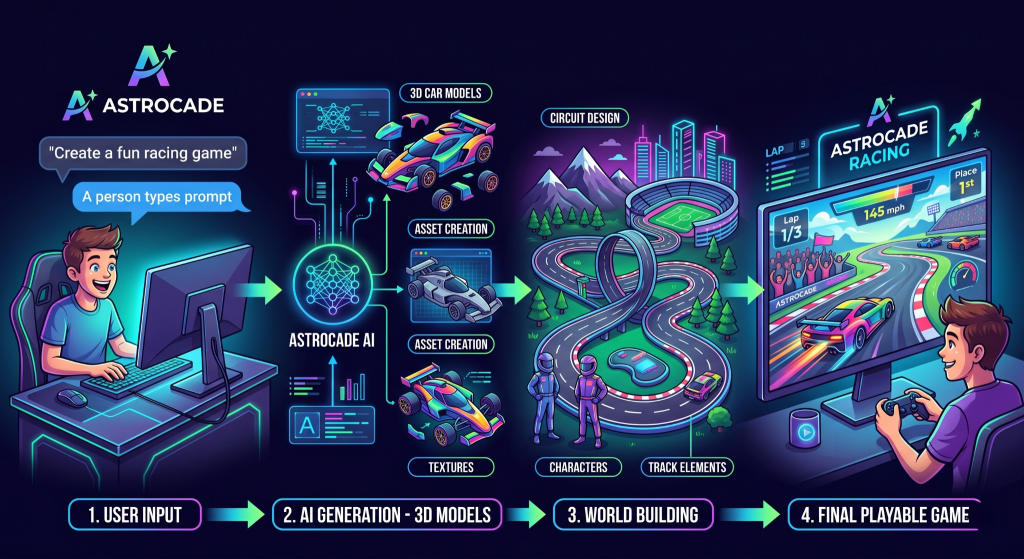
Astrocade is useful for creators who want to move from an idea toward a playable experience without beginning with a heavy technical setup.
This approach can support:
- Fast concept testing
- Rapid iteration
- Early player feedback
- Mechanic experimentation
- Accessible development
- Creative learning
It can also help people create game concepts without becoming trapped in technical preparation before testing whether the central idea is enjoyable.
For beginners interested in making games, the ability to experiment quickly is valuable because design improves through repeated testing.
A creator can build a game, observe where players become confused or lose interest, and revise the experience before investing months in full production.
The purpose of an accessible platform is not to make professional engines unnecessary. It is to help more creators begin projects, complete playable versions, and learn from real player interactions.
Final Verdict
Choose a visual creation platform when speed, accessibility, and rapid testing matter most.
Choose a professional engine when your project requires deep customization, advanced performance control, specialized systems, or long-term technical growth.
New creators should resist the pressure to select the most powerful option available. The best starting tool is the one that helps you produce a playable result, collect useful feedback, and improve the central idea.
Your first project does not need to prove that you can master every area of development.
It needs to teach you how an idea becomes an interactive experience.
Once you understand that process, you can adopt more advanced technology for a clear reason instead of choosing it simply because professional developers use it.